How To Show Post Title Before Blog Title In Blogger You don’t have to do a Herculean task to make your blog title appear first. I am going to walk you through the exact process so that, you will not lose it in the midway. Go to your blogger dashboard. Click on Template. Then, click the Edit HTML button.
Click to put a check in the Expand Widget Template box. Now press Ctrl+ F and search for the following code in your template’s code:
<data:blog.pageTitle/>
Once you find it, replace the same with the following.
How to Promote Your Blog on Social Media to Get More Traffic
Blogging can be a fun and creative outlet to share your talents, interests and favorite things. If you’re a blogger, chances are good that you enjoy writing, teaching and networking. Otherwise, you probably would’ve chosen another way to spend your time. But even if you truly enjoy blogging, it can be incredibly disheartening to put your energy and soul into something that few people are able to see.
In addition, you probably want to make some money for your endeavors, and we all know companies want to see an engaged audience before they start investing their dollars. Therefore, it’s important to find ways to reach the people who would enjoy your content. Check out the tips below to discover some concrete steps for how to promote your blog on social media to get more traffic.
Share Your Link
The first tip probably seems quite obvious, but it’s often overlooked. You need to make sure your blog link is posted on every social media site you use. In fact, it’s good to place it wherever you go online, including your email signature. As you begin to share on social media, your audience will likely check out your profile. Have your blog name and URL prominently displayed so folks can find you.
Take Advantage of Automation
Social media marketing is a time-consuming process. That’s not even counting the hours you spend researching and writing your posts. Save yourself some work by using automated services whenever possible.
There’s Instagram automation software available that uses AI to help you target and accumulate relevant followers in your niche. You can also put scheduling services to use that automatically send your posts out to social media channels at designated times.
Make a Plan
Each social media site is unique and should be treated as such. That means a cut and paste job just won’t cut it. It’s crucial that you invest some time to study each platform you want to use to determine what type of approach is most successful on each.
While we’re on the subject of platforms, keep in mind that you don’t have to be everywhere. In fact, this is counterproductive. Your time will best be spent becoming well-versed on just a few sites where your most relevant audience can be found.
Know the Trends
You should definitely be in the know when it comes to your chosen niche. After all, your readers are looking to you to stay informed. You also must stay on top of online trends such as hashtags and the latest features for sharing on each platform. Each social media site has its own array of offerings.
For example, Instagram gives you Instagram Stories, which allows you to highlight some of your latest and most relevant posts. Facebook Live is a popular feature for those who enjoy being on-camera and giving their audience timely updates on the latest happenings their niche. In addition, knowing the trendiest hashtags and trends gives you countless opportunities to stay fresh and fun.
Metrics Matter
Chances are, you check out your blog stats regularly to see how many visitors you’re getting and whether these numbers are increasing. There’s a lot more you can glean from these metrics, along with other analytics services to specifically help you track your social media patterns. When it comes to your own blog stats, it’s important to investigate where users are coming from.
This tells you which platforms are working best for you, so that you can focus your efforts there. Social media monitoring tools can give you the down and dirty on your social media numbers. Be aware that trial and error is a natural part of the game here. Keep tweaking until you find the platforms and approach that work best for your brand.
Make Sharing Easy
If you want more people on social media to see your blog posts, you have to make it as easy to share them as possible. Have social media share buttons at the end of each post on your blog. Be sure links are included in your Facebook updates.
Utilize features like Instagram Stories that let you share your links. You can also share those of others. Folks will appreciate your shout out and just might reciprocate. This is a great way to gain followers from new sources.
Network, Network, Network
As mentioned above, sharing the content of others is one way of upping your own follower count and ensuring more people see your stuff. There are tons of other ways to network, and they’re all so important. After all, this is social media. Reaching out to others in multiple ways is what it’s all about. Find influencers in your niche. Follow and interact with them.
Then you can consider reaching out to form collaborations that are mutually beneficial. Remember, that authenticity and relationship-building go a long way toward convincing people to work with you. Your ever-growing audience of fans can even get in the game when it comes to promoting your brand. Contests, follower testimonials, shout outs and more can help you to increase engagement and encourage promotion.
Remember the Basics
By now, you understand the possibilities social media marketing can offer. You can promote your blog and get more traffic through strategic use of the sites. However, in your quest for readers, don’t forget the very basics of blogging. Content is still king.
Be sure you’re spending significant time to create informative posts that are visually appealing and give your audience what they’re seeking. Otherwise, it’s really all pointless.
Follow these tips on social media promotion, and you’re sure to see your traffic soar. Good luck, and have fun.
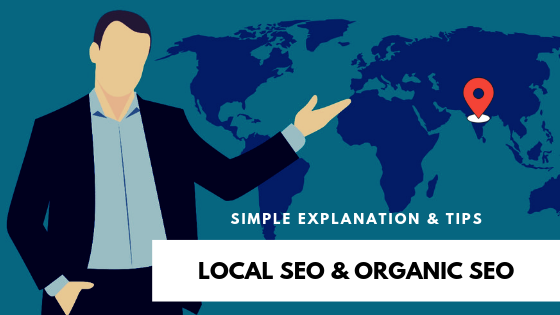
Local SEO & Organic SEO | Simple Explanation & Tips
Search Engine Optimization or SEO, I guess many you have heard these terms if you have been around the digital marketing atmosphere during the past few years.
Going a little deep into the term SEO, you might even be familiar with the term’s Local SEO and Organic SEO.
Local SEO & Organic SEO | Simple Explanation & Tips
What is Organic SEO?
Major search engines like Google, Yahoo, and Bing have a unique algorithm that identifies the location of the user and provides the most accurate results based on their search term.
Organic SEO also referred to as National SEO provides search results in multiple areas and location.
Natural search results that are displayed on the search engine for generalized search terms or keywords are is known as Organic SEO.
For example, if you want to rank high for the search term “Digital Marketing Company”, you will need to include that word in high-quality content on multiple online platforms and websites.
In this case, whenever a user searches for “Digital Marketing Company”, your web page will be displayed in top search results of search engines.
Your targeted keyword or search term can either be a single word or a “long-tail” word based on your intent.
Search engines use hundreds of factors to rank and index websites in search results, including keywords, inbound and outbound links, and even grammar, to name a few.
What is Local SEO?
Local SEO is similar to Organic SEO, but it’s more concerned about geographic location specific sense.
A lot of small business owners and local businesses use local SEO services in order to advertise locally and build their brand awareness.
The competition for Local SEO is not as tough as Organic SEO. But still, it needs time, efforts and research to get it right.
If a user searches for a particular service or industry along with location, the search engine knows and understands that particular search term is for local intent. Thus, the search engine displays the results accordingly to the search term.
Local Search Example
For example, if a user searches for “Digital Marketing Company in Surat”, or “Digital Marketing Company Near Me”, the search engine will optimize the search results to that specific area.
These types of search term guide the search engine that the user is looking for something within a specific geographic area instead of general.
And even, if the user just searches for “Digital Marketing Company”, the search engine will display local search result also, as it will assume that the user is looking for a local digital marketing company.
So, what’s the main difference between Local SEO and Organic SEO?
The main difference between Local SEO and Organic SEO is the geographical component.
Local SEO targets geographic keywords while organic SEO addresses terms of more general keywords
Local SEO can be cheaper because it only competes with other local businesses and not with nationalizing businesses.
Local SEO is ideal for small local businesses such as restaurants, retail stores, beauty salons, lawyers, clinics, etc.
What should you focus on? Local SEO or Organic SEO?
Image Credit: Pixabay
Well, this is not a hard decision, it totally depends on your business and service.
If you have a local business like a fast food restaurant in a specific location, you will need to focus more on Local SEO.
Though, if you want your business to get ranked high on search engines for certain search terms not limited to a specific location, you may opt for Organic SEO services.
If you are more focused on building a brand identity for your business, then you should invest your time more in developing your organic reach.
Even, local businesses can take the benefit of organic search to expand their brand identity.
Take a look at some useful tips to improve your local SEO
Claim Your Google My Business Listings
When you create your Google My Business account, you can make sure your name, address, and phone number are correct. You must also include a brief but informative description of the company, a link to your website and opening hours, etc.
Add Location Pages to Your Website
By having a specific landing page for each of your business sites, search engines can easily locate your listing and provide the appropriate location for the user.
Maintain NAP Consistency
One of the best things you can do to improve local SEO ranking is to list NAP addresses (name, address, and phone number) in professional directories such as those available on Google and other search engines.
Get Reviews
Reviews are an important factor in local rankings and also help your ad stand out. If you manage to convince your satisfied customers to leave you a Google review to thank you for your positive experience, it can go far beyond any other local SEO tactic.
Social Media Platforms
Social media platforms are free. So, this is not new, it can be a great way to stay in front of your audience. Google and other search engines will search and extract search results from your social platforms, such as Facebook profiles and page reviews, your company’s LinkedIn or YouTube profile, and even your Twitter account and recent tweets.
Conclusion
In this digital era, SEO is not limited to market activities. It has the potential to connect consumers and businesses around the world.
Remember that even if SEO is an optimization for search engines, that’s what helps consumers find your business.
While you want to make sure that search engines know your business and your website, it’s important to think of potential customers who are looking for your business.
Do not just optimize for Google to know what you’re doing. Make sure users can find all the information they need about your business, such as exact location, schedules, services or products, etc.
Here am going to show you how you can create Google Adsense 100% Approve. Our techniques are 100% real and useful. We are sharing free of cost tips and tricks to peoples for online purpose.
Here you go!!
1. First Of All create a brand new gmail address.
2. Put All Details Put you details correctly and 1 thing you need to do here is Select your country US, UK, Canada, Indonesia. Not Pakistan Put a recovery email address must Don't skip "Prove you're not a robot" section
3. Now Go to YouTube Homepage When You click on Sign in Button it will automatically redirect. If not then you can put you gmail address and password.
4. After Sign in You Will See You Profile Button On The Place Of Sign in Button
5. Click On you profile button and go to creator studio
5. Now On the left sidebar click on My Channel And Create A Channel As You Need
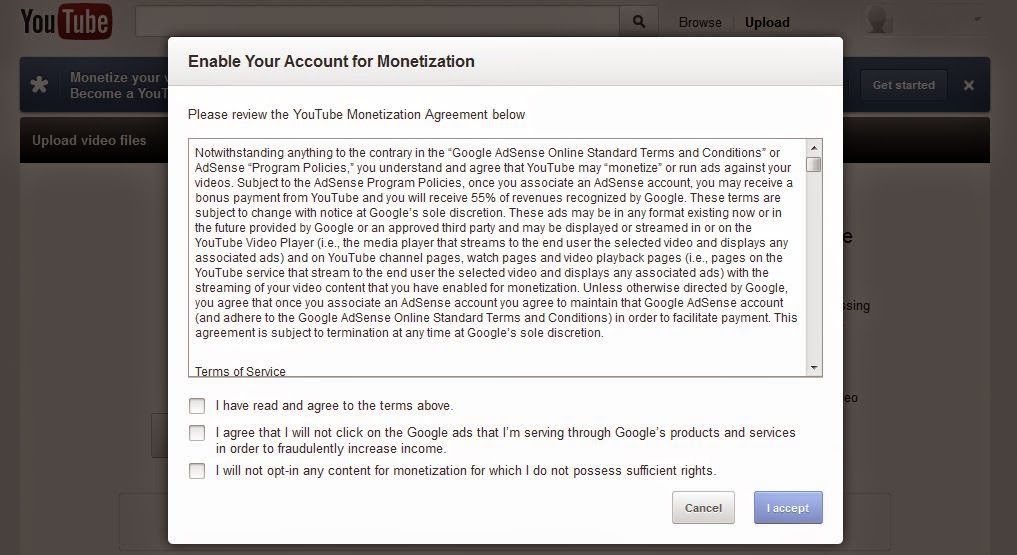
6. Now Go To Channel Setting Click Monetization and enable it
Check All Three Options
7. After Enable Monetization Go to Setting and click "How will I be paid" Here is an option for apply Google Adsense
Now simply apply for adsense and put all necessary information You will get email back about 1 or 2 hours. Some time it take time about 1 or 2 days. So don't worry and be patient. Subscribe Us For More Tips And Tricks.
Check out this top quality list of guest blogging sites including categories such as Blogging, Marketing, Business, Social Media, Spirituality, Psychology, Writing, Self-development and many others.