Showing posts with label Basic Blogging Tutorials. Show all posts

Now, use Google's complaint form to report fraud on Maps


Now, use Google's complaint form to report fraud on Maps


Now, use Google's complaint form to report fraud on Maps 
Google has launched a handy new way to combat the issue of fraudulent activity on Maps.
The search giant has started Business Redressal Complaint Form allowing Maps users to report cases of fraud or fake information related to businesses.
It can be used by anyone who notices fake information on the platform, intended to harm businesses or to fool the customers.
Here's more.


How Google Maps' businesses plagued by fraudsters 

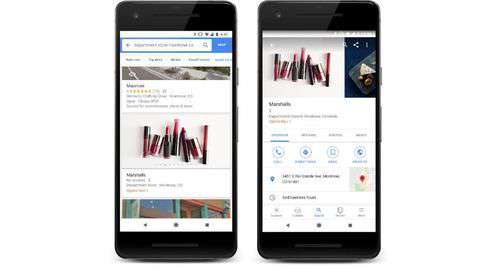
As Google Maps' business information relies on publicly-sourced data, it allows users to edit the information related to businesses with the popular 'Suggest an edit' option.
However, sometimes, bad actors, competitors, and others use this option to modify a local business' authentic information.
They change open hours, phone numbers, addresses or even URLs to hurt the entity and its potential/regular customers.

Sometimes fraudsters even target customers with this option 
With the new complaint form, users witnessing such activity can report it directly to Google.
The reporters, as Google says, will have to provide their own details along with the name and location of the business and the piece of information (URL, number) that might lead to fraud on Maps.
Notably, they'll also have to upload screenshots and provide a description of the issue.


Submission might not always lead to action, says Google 
While this option offers a reliable way to combat fraud stemming from Google Maps, it's important to note that submitting a complaint might not always mean that action will be taken.
Google will review your complaint and if it doesn't appear credible, the company might not take any action.
Also, if the complaint is not related to fake business information, it won't be reviewed.

How To Add Comment Form Under Every Post

Commenting is a very helpful feature for every bloggers,Because They can know what visitors think about their site.We can easily integrate comment form under every post with no extra effort.To do this follow these simple steps.
log in to your dashboard--> Setting- -> Comments
Now goto "Comment Form Placement" and Check "Embedded below post" Option.
Click on Save Settings.You have successfully embedded Comment form in your blog.
Note : Wait !!! If Above method doesn't work for your template continue with below steps.(including above step)
Go to Layout- -> Edit HTML.
Click on "Expand Widget Templates".
Scroll down to till you see below code:
<b:include data='post' name='comments'/>
Now copy and paste below code immediately below the above code:
<b:include data='post' name='comment-form'/>
Now save your template.You are done.

How To Hide Your Post Date,Time and Author

1.Log in to your dashboard--> layout- -> Edit HTML
2.Click on "Expand Widget Template"
How To Hide Post Date
Scroll down to where you see this:-
<data:post.dateHeader/>
Now delete this code.
Save Template and preview your site.
How To Hide Post Time
Scroll down to where you see this:-
<span class='post-timestamp'>
<b:if cond='data:top.showTimestamp'>
<data:top.timestampLabel/>
<b:if cond='data:post.url'>
<a class='timestamp-link' expr:href='data:post.url' rel='bookmark' 
title='permanent link'><abbr class='published' 
expr:title='data:post.timestampISO8601'><data:post.timestamp/></abbr></a>
</b:if>
</b:if>
</span>
Now delete this code.
Save Template and preview your site.
How To Hide Post Author
Scroll down to where you see this:-
<span class='post-author vcard'>
<b:if cond='data:top.showAuthor'>
<data:top.authorLabel/>
<span class='fn'><data:post.author/></span>
</b:if>
</span>

Now delete this code.
Save Template and preview your site.

How To Add Feedburner FeedFlare below your Blog Post

How To Add Feedburner FeedFlare below your Blog Post


If you want to add the FeedFlare to your blog follow the instruction below.
1. Login to your Feedburner account.
2. Click on the Feed Title.
3. Click on Optimize Tab.
4. Click on FeedFlare.
5. Check on the services you want to display in your Feed or on your Site.
6.There is a FeedFlare Preview/Ordering below the list of services. This lets you see how FeedFlare will appear in your feed and/or on your site. Just Click and Drag the links on the location that you want.
7.Click on "Activate".Now You will get this message.
8.Now in this window Before the Save button, there is a "Get the HTML code to put FeedFlare on your site". Choose the Blogging Platform as "Blogger"
9. A pop-up window will appear and it contains the instructions on how you embed the Feed burner FeedFlare on your blog.Just follow the instructions.Now wait about 20 minutes and refresh your site.Look at the example below.

How To Get Know When Googlebot Last Visit

How To Get Know When Googlebot Last Visit


Googlebot is the web crawling bot program (spider) used by Google, which discovers new and updated documents from the web to build a searchable index for the Google search engine.
If you want to display when the last time google bot visit to your site , add your site/blog url going to www.gbotvisit.com and click on "Check Google Bot last visit" button.

Now copy and paste the code provided by gbotvisit.com into your blog/website.
If you are using Blogger, add it to "HTML/JavaScript" box. Final result will look like this.
This image is updated every day.

How To Reduce Bounce Rate Of Your Blog / Website

How To Reduce Bounce Rate Of Your Blog / Website

 
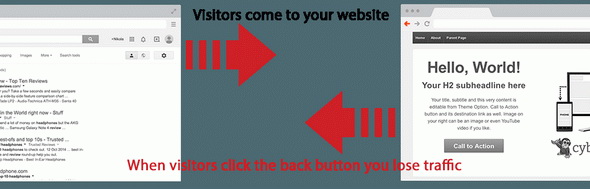
Bounce rate is very important factor of your website.  It is playing very crucial role with your web site traffic and income. We can explain bounce rate like this. Rate of when visitors came in your website and immediately click back button on your browser.
ZERO BOUNCE WordPress Plugin
This is actually very disadvantage point to your website. It is loss of traffic! Loss of traffic means loss of your sales or income. So, you need to more attention about your bounce rate.
These days bounce rate is major factor to go higher ranking in search engine. So, people are trying to reduce their bounce rate many ways.
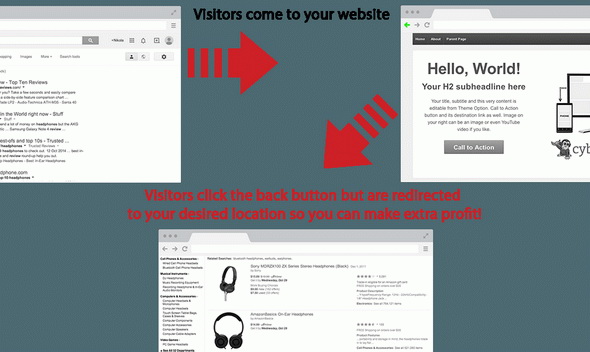
If your run WordPress website, I have great news for you to reduce bounce rate and increase your income. It is a WordPress plugin called " ZERO BOUNCE WordPress Plugin " that has great ability to reduce your bounce rate and increase your income. According to their observation 50% -70% your valuable traffic leave your website without spend time in your website. You can redirect them to coupons, discounts, Amazon, and other offers pages. The point is get more sales from that loosing traffic.
ZERO BOUNCE WordPress Plugin

How To Hide Blogger Blogs from Search Engines

How To Hide Blogger Blogs from Search Engines


Although displaying in your blog in search engines is important to bring more visitors, we can hide Blogger blogs from search engines and remove our blog from blogger listings very easily through Blogger.com settings. This is useful if you are running a personal blog and do not want to become it "Private" through Blogger settings.
First Go to "Settings" › "Basic" of your blog. Click "Edit" link of your privacy settings.
Blogger Privacy Settings Edit
There are two settings under privacy settings with "Yes" and "No" options.
1. Add your blog to our listings?
A Listed blog may be linked to from Blogger.com, such as the Blogger home page and Next Blog. If you select "No" your blog will not appear in these places, but it will still be available on the Internet. This blog will still be displayed on your profile unless you hide it.
2. Let search engines find your blog?
If you select "Yes" blogger will include your blog in Google Blog Search and ping Weblogs.com. If you select "No", everyone can still view your blog but search engines will be instructed not to crawl it. If there are links to your blog from other websites, search engines may still suggest your blog in response to queries.
Check "No" radio buttons for both above settings and click "Save changes".
You have successfully hide your blog from search engines in blogger listings.

How To Submit blogger sitemap to yahoo to index your web pages

How To Submit blogger sitemap to yahoo to index your web pages


Submitting your site to yahoo is easy and give your web pages more exposure.
All you need is a YAHOO ACCOUNT(ID).However,you don't need an yahoo ID to know the information like how many pages are indexed,etc.But,if your blog is a new one or no pages in your blog are indexed(type your blog url in yahoo search and see to check whether your web pages are indexed or not), then you want Yahoo id to submit your sites,feeds,etc.
Let't see how to make yahoo index your webpages by submitting your blog sitemap.
2. Click on the 'Sign in' link which is at the top of the page (If you don't have a Yahoo id, you can get one here) to sign into your account.
3. Type your blog url in the box provided and click on the 'Add My Site'
4. After adding your site,you need to Authenticate(Verify your ownership).
Now click on the site name which submitted you and then click 'Authenticate' in the next page.
There are two ways to verify your ownership.One is to upload a file to the root directory of your site which can't be possible in blogger.
Another one is to 'adding a metatag' which is possible and the only way to verify ownership for bloggers. First,copy the metatag..
Next,sign in to your blogger account>Edit html and paste the metatag below the head tag and SAVE THE CHANGES.
When you return to Yahoo! Site Explorer, click the button that says “Ready to Authenticate”
Next,you will get a message saying that 'Your site is pending authentication'
Note: Don't remove the metatag,they will revalidate your ownership by checking your ownership regularly.
5. Next,go back to the 'Site explorer home', and check the box next to your blog url and click on the Manage button.
6. Type rss.xml or atom.xml in the box provided.It helps yahoo to discover more of your site content via your rss or atom feeds and to index your blog pages quickly whenever your blog is updated.Next,click on the add feed button.
That's it.Now,you have sucessfully submitted your blog sitemap to yahoo.Check your account after a couple of days and you will see your blog indexed in yahoo search engine.
Meanwhile,if you didn't submitted your blog sitemap to google,please read this about How to Submit your blog sitemap to Google

How To Redirect Blogger URL To Another URL

How To Redirect Blogger URL To Another URL


1.Log in to your dashboard--> layout- -> Edit HTML
2.Scroll down to where you see <head> tag.
3.Add below code into your template just after the <head> tag.
<meta http-equiv="refresh" content="0;url=http://yournewurl.com"/>
It should Look Like This.
<head>

<meta http-equiv="refresh" content="0;url=http://yournewurl.com"/>
4.Replace http://yournewurl.com with the URL you want to redirect your old blog.
5.Click on Save Templates and you are done.
Now your blog traffic will be redirected to your new address.

How to Add Author to Blogger Blog

How to Add Author to Blogger Blog


If you are going to run a multi-author blogger blog or if you need to add another administrator to manage your blog/edit your Blogger template, then follow this simple tutorial.
Your blog team members can either be administrators or not. Administrators can edit all posts (not just their own), add and remove team members (and grant admin access), and modify the blog's settings and template. Non-admins can only create and edit their own posts.
1.First login to your Blogger account and go to Settings › Basic.
Blogger Basic Settings
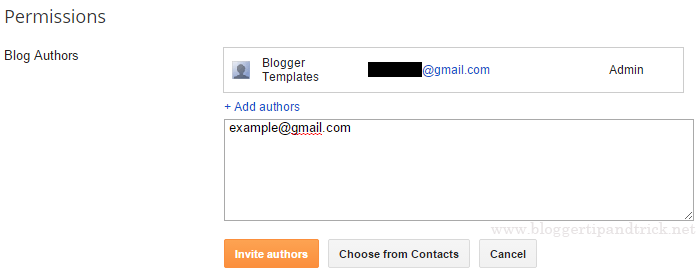
2.Under "Permissions" section, you can see "Blog Authors" setting.
3.Click on "+ Add authors". Enter your new author's email address and click "Invite authors".
Blogger Invite Authors
You are done. Now an email will be sent to that author with a link to join into your blog.
Clicking on "Accept invitation" button, he can become an author of your blog.
If you want to change that new user's user role from "Author" to "Admin", again go to Settings › Basic to do that.

How To Backup Your Blogger Blog

How To Backup Your Blogger Blog


Backing up your data is such an important thing to do when you have a good website or blog. You can backup your blogger blog as a .xml file to your hard drive.
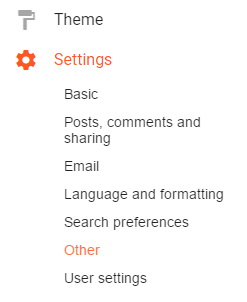
Go to "Settings" -> "Other" page of your blog.
Blogger Other Settings
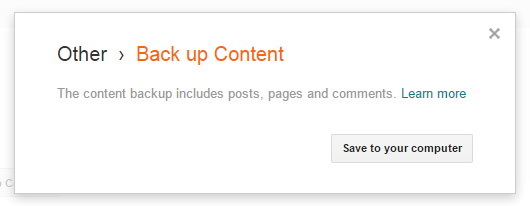
Click on "Back up Content" button.
Blogger Back up Content Button
Now click on "Save to your computer" button.
Blogger Save Backup to Computer
Choose a location of your hard disk to save the backup file and save it.
Note: This backup file includes posts, pages and comments.
If you are updating your site frequently, don't forget to backup it at least once a week.

How To Import Your Older Blog to New Blogger Blog

How To Import Your Older Blog to New Blogger Blog


1.Log in to your Blogger  dashboard.
2.Click on "Settings".
3.Click on "Basic" tab.
4.Click on "Import blog"

5.Now Click "Browse" and choose your old blog file (.xml)  from your computor and click "Open".
6.Now type correctly the characters you see in the picture.
Note : You can your imported posts publish Automatically,checking box  "Automatically publish all imported posts"  or you can manualy publish them later.
7.Now click "IMPORT BLOG"
You are done.

Top 5 Blog Niche Ideas My Blogging Students Choose

Yay, you decided to start a blog! Now quickly choose one of the 4 million topics that are out in the blogosphere that you want to talk about for years to come. And, make it could because it's what you're going to build your blogging business around. No pressure, right?!
This sounds overwhelming because it is. But, don't worry! I'm going to share with you the 5 blog niche ideas I see most from my students using and how you can make it work for you. 
Here are the 5 most popular blog niches:
1. Food
2. Mommy/parenting
3. Health
4. Travel
5. Self-Improvement
Download the list of 160+ blog topic ideas that can make your site stand out more than the typical “mommy blogger,” “food blogger,” or “lifestyle blogger” sites.

Want 160+ blog niche ideas that aren't boring? 

Use this list to find a blog topic that is more exciting (and more profitable!) than the typical "lifestyle blogger" niche.

Choosing a blog topic

When I first set out on my blogging journey, I asked myself, "what should I blog about?" Then, I sat down and made a list of everything that I was interested in. It's a good way to find interesting topics to write about. But there were a lot of things on that list! 
When you're trying to figure out what to blog about, make sure that you end up choosing just one topic. If you don't then you'll end up writing about anything and everything. And, when you do that no one will read your blog because they won't understand what it's about. Here are some other things that you'll want to think about when choosing a blog topic:
  • Can you think of ways to make money on that topic? We are focusing on building a blogging business, not just blogging. That means you need to be able to think of ways you can make money from your blog. Are there products you can create? Affiliates that you can connect with? 
  • What could you talk about all day? You need consistent content if you're building a blogging business. Do not pick a topic that you get tired of easily. It needs to be something that you could talk to anyone about anytime. 
  • What do people want to read about? I'm not going to lie, there are audiences out there for just about any topic you can imagine. But if you want to make money you need to think about choosing a topic that has a large enough audience that you can keep a steady stream of money coming in. 

Where did these 5 blog ideas come from?

As of today, I have a couple of thousand students that are in my paid blogging courses. I've also had tens of thousands of bloggers come through my free courses and resources. To find this list of five I did some digging to see what these bloggers were writing about. 
And, I have to say that my members never fail to amaze me. They are so creative! I think it's pretty safe to say that I've seen it all. However, there were some trends. And, while they might have all had different niches with the topics, the five listed above came up time and time again.
If you are a blogger that blogs about something else that doesn't fall within one of these five, I'd love to hear about it. You can leave it in a comment below the video on my YouTube channel (and don't forget to subscribe while you're there) or drop it down below. 

1. Food

The first category that made the list was food. Who doesn't love food? People love to read about, cook it, eat it, and take pictures of it. All of that makes this one a really popular topic. There are so many ways that you can blog about food. 
You can share cooking tips, restaurant reviews, or recipes. This is an area that I enjoy seeing all the ideas that my students have come up with. They never fail to put a new spin on things. If you're wondering why that's necessary, check out the section below about choosing a narrow niche.

2. Mommy/parenting

I just love being a mom! It's hands down my favorite role that I've ever had in my life. And, I'm obviously not alone. My bloggers and followers love to blog about their experiences as a mom. I think this is a popular niche because as parents there are so many things we need advice on. 
When you become a new parent there are about a million different scenarios that you aren't 100% sure how to deal with. Then, every time you think you have your kiddo figured out, they hit a new stage, and everything changes. That means there are tons of directions you can go in with your mommy blog or parenting blog. 
For example, if you are a mom of multiples you could focus on that. Or if you have a child with celiac disease, you could write valuable content to help other parents in the same situations. The list really goes on and on when you break down ages, stages, and interests. 

3. Health

I think now more than ever we are really aware of health issues. We've been educated on what we should be putting in our bodies and what we shouldn't. That makes the health care topic a big one. And, it isn't just physical health, there are plenty of blogs on mental health as well. 
You could start a fitness blog or a blog for people that suffer from anxiety or depression. Think through the areas of health that you are the most experienced in, passionate about, and would enjoy writing about. How can you use your experience to help others? 

4. Travel

This is a topic that's really interested to me because I'm a bit of a homebody. Traveling for me usually means one time a year. And, I like to go to the same places and do things I'm familiar with. 
However, I have some amazingly adventurous travelers in my blogging courses. I just love to see when they start their travel blogs. They talk about all different kinds of things regarding travel. There are some that travel around the world and others that stay within the United States. 
The world is the limit when it comes to travel blogs. You can focus on far off destinations. Or, you can start a blog for people traveling to your local city. You can share tips on attractions to visit, restaurants to eat at, or destinations that get you off the map. 

5. Self-Improvement

There are a lot of variations when it comes to the self-improvement category. It's a broad category that includes a lot of topics. For example, you could blog about how to overcome failure and fear, time management, thinking critically, or how to be more productive. 
I do have one warning in this area. From what I've seen, it can be hard to identify what some blogs are about in this topic. So, I really recommend that if you want to blog about self-improvement that you think about what part of self-improvement you are the most passionate about. 
Don't just decide to be a "self-improvement blogger". Instead, as an example, you could be a "time management blogger". Your blog could be all about sharing helpful time management books, tips on time-management for the morning, the afternoon, and how to teach your kids time management. While you will be discussing a self-improvement topic, everyone who lands on your site will know exactly what it's about. 
You should need to be really specific. I've noticed that it can be harder for my students to grow their blog as fast in this blog topic. It can go in so many directions that it's really easy to spread your blog too thin covering too many different things. This makes the blog vague. 
You want to make it 100% clear what your blog is about. Your readers should be able to spot your niche right off the bat.

Why is it important to choose a narrow blog niche?

There is one thing that you are going to constantly hear from influencers as you work on building your blogging business—niche down. You may find yourself wondering what this even means. Let me help you out. 
A niche is a specific topic for your business. It's when you take the broad topic that you selected and choose just one part that you are going to focus your blog around. For example, instead of having a food blog, you decide to have a food blog where everything is geared towards moms that are cooking for picky eaters.
All of your recipes and tips that you share are written with that niche in mind. If it doesn't relate to moms cooking for picky eaters than you don't put it on your blog. Why is this a good idea? Because it lets people quickly identify what your blog is about. It also allows you to become the "expert" in that area. 
If a mom with a picky eater finds your site, she's going to keep coming back because everything on the site is useful information for her. People are overloaded with information online every day. If they have to sift through things that aren't helpful to find what is on your blog, they will go somewhere else. 

Having trouble finding a niche?

If you want help on niching down within one of these main topics shared above sign up for the free resource on this page. You will have over 160 niche ideas to get your wheels turning!

How to Register a free Blog on Blogger via an Android phone

Technological developments that are very fast provide a lot of convenience for us to do things that previously could not be able and easy. Previously to create a website or blog can only be done using a desktop device, but now, we can create a blog using only an cellphone or smartphone. For example this blog, I created using an Android smartphone, both for writing articles, making pictures, editing images, to edit HTML on themes (formerly called templates). All I do with an Android smartphone.
Android Blogger

Many platforms provide services for creating blogs, such as Blogger, Wordpress, Jomla and Mywapblog. However, here I will only explain how to create a free blog on Blogger / Blogspot via an Android phone. Because in my opinion Blogger is the best platform to create a blog, besides 100% free, Blogger is also very easy to use, even if you are a beginner. The proof is that I myself am a blogger who started blogging from scratch and only relied on Google as a place to ask. And one more thing, Blogger is one product from Google, the king of cyberspace.

Actually there is almost no difference between how to create a blog through HP by creating a blog via desktop / laptop. The difference is only about email from Gmail.

Strengths and disadvantages How to Make a Blog on an Android phone / smartphone.

  • No need to make an email, because I'm sure every Android phone already has a Gmail account that was created when it first started operating your Android cellphone / smartphone to access the Play Store and various services from Google. However, if you haven't had the chance to create a Gmail account, please follow the tutorial on how to create a Gmail account on an Android phone .
  • Which is clearly more efficient internet data quota, because the smartphone screen size is smaller than the desktop, so it doesn't use too much internet data and is certainly more practical.
  • As for the disadvantages, maybe only when editing HTML, it's a bit difficult, but there's no need to worry because I have a solution, please read How to edit the HTML template on your Android phone .

Here's how to register Blogger via an Android cellphone / smartphone. 

1. Visit the site www.blogger.com , after opening then click Create Blog
Register Blogger via cellphone

2. Fill in the password or password from your Gmail account, click enter.
Google email


3. Next you are told to confirm the profile that will be displayed on each published post / article. If you want the Google+ profile displayed then just click continue to Blogger. But, if you want to use another identity such as a pseudonym, please click switch to a limited Blogger profile to set the profile to be displayed.
Blogger Profile

4. Click Create a New Blog
Create a new blog

5. In the new page window, fill in the blog title and blog url address.
Blog title and address

Title : write the blog title as you wish, it should be short and easy to remember, if possible adjust to the general topic of the content you want to present 
Example: 
Somad Blog's 
How to Somad 
Somad Food 

Address : write the blog address which will later become the url address of your blog. Use all lowercase letters, don't use spaces, and don't use any punctuation except for a period (.) And a minus sign (-). Use of numbers is also allowed. 
Example: 
somadblog 
somadblog77 
ways 

Wait until the process is complete

  • If an exclamation point appears with a red background along with the words "This blog address is invalid or not supported". That means there is a writing error, please change it.
  • If an exclamation point appears with a yellow background with the words "Sorry, the address is not available". That means the address / url has been used by someone else, please change it.
  • If a check mark appears along with the words "Address this blog is available". That means you can use the address / url.

Select the theme / template you want to use. Just choose a Simple / Simple theme first. You can change theme affairs later. 

"Or maybe you are interested in using a modified Blogger template to be responsive and mobile friendly" , you can see the list HERE . 

6. Click Create Blog. 

Congratulations, you already have a blog that is ready to be filled with articles. 

Also read: 

How to login / enter a Blogger account via HP Android 

How to register a new blog on Blogger

To create a new blog, you no longer need to create a new Blogger account. Just enter Blogger, click the arrow in the upper left side next to the blog title, then select a new Blog(the very bottom). Follow the next steps as in step number 5 above.